
It’s hard to find people on Twitter who share your interests. Facebook and LinkedIn offer “People you may know,” but Twitter doesn’t. Many users join, tweet once, and ask, “Now what?” Here’s a simple fix. Use a specialised Google search. This advanced search helps you spot tweeters linked to your business fast. It saves time and boosts your reach with smarter, targeted discovery on Twitter.
And the “intitle:” string filters profile pages from individual tweets. This happens because Twitter puts “on Twitter” at the end of the title of every profile page:
Copy and paste site:twitter.com -site:m.twitter.com intitle:” on Twitter” keyword into Google. Replace “keyword” with your own. This Google search trick gives you niche Twitter profiles tied to your topic.
For example, try a Twitter keyword search for “office furniture.” Twitter shows people tweeting about it now, but you can’t confirm long-term interest. This advanced Google search for Twitter helps you find Twitter users by keyword with better accuracy.
But our custom Google search returns a bunch of profiles that mention office furniture (most of them in the title):
And let’s click on the first result to see if it’s what we’re looking for:
You’ll see results filled with office furniture tweeters. One profile may even call itself “Office Furniture.” Pretty cool, right? This Twitter profile search trick isn’t real-time. It pulls the last version Google saved, which may be a month old.
Still, the Google Twitter search method helps you spot niche Twitter users fast. It returns the “most important” profiles for your topic. It also filters random tweets that only mention your keyword once.
It’s not perfect. You still need to open profiles to confirm fit. But it’s a strong starting point for Twitter audience research and more brilliant Twitter user discovery.
6 Ways to Find People to Follow on Twitter
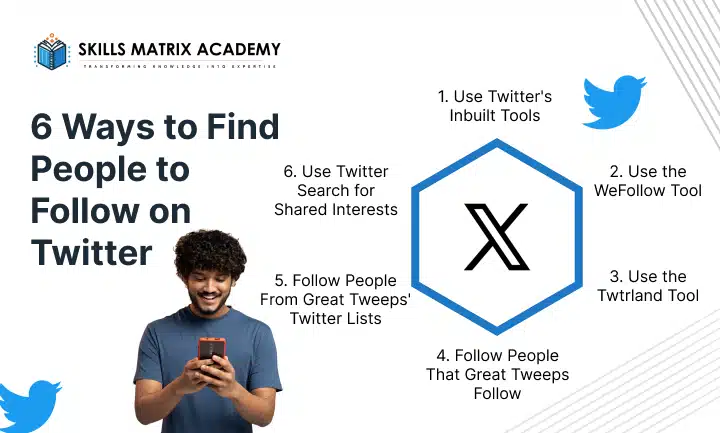
When you start on Twitter, it’s easy to obsess over follower count. But real growth begins with who you follow on Twitter. Choose people who fit your interests. Follow users who relate to your business. Pick accounts that talk about topics you care about. This helps you learn faster. You understand the platform’s tone, rhythm, and language just by watching tweets roll in.
I’m also teaching a beginner-friendly Twitter and social media course for WeTeachSocial. This post is a condensed version of a complete lesson. I’ve added suggestions shared by my Facebook followers, too. These tips help you find people on Twitter and get off to a strong start.
- Use Twitter’s Inbuilt Tools
Twitter wants you to connect. That’s why it gives you innovative suggestions. Click the Discover tab to explore three simple options. You can select Find friends to locate people you already know. You can choose who to follow to find creators and popular users in your niche.
You can check Popular accounts to see users grouped by specific interests. These Twitter inbuilt tools keep suggesting new accounts in your sidebar. You also see recommendations whenever you follow someone new.
- Use the WeFollow Tool
WeFollow is one of the most helpful Twitter directories. You don’t need to register. Simply search by tag.
It’s a fast way to discover new tweeters in any niche. Tags make it easier to build your Twitter niche audience and connect with people who already talk about your industry.
- Use the Twtrland Tool
Twtrland (now Klear) is another excellent tool—no registration needed. Type a keyword to return relevant profiles. You can preview each user. You see how often they tweet, retweet, and interact.
These quick insights help you choose active, valuable Twitter accounts to follow.I discovered this tool recently, and it’s already becoming a favourite for building Twitter audiences.
- Follow People That Great Tweeps Follow
Once you follow a few people, some will stand out. Some tweets have insightful content. Some share ideas you enjoy. If you like someone’s tweets, check who they follow. Great Tweeps usually follow great people.
This makes Twitter user discovery easier. You often find hidden gems that share your interests and fit your business niche.
- Follow People From Great Tweeps’ Twitter Lists
Some users follow thousands of people, making it challenging to sort through their list. Instead, check their Twitter lists. Lists offer a filtered collection of top users. It’s easier to find experts and creators grouped neatly. Lists save time and help you grow with purpose. They’re great for Twitter engagement strategy and building a strong network.
- Use Twitter Search for Shared Interests
Twitter search tools are underrated. Type a keyword into the search bar, and Twitter shows both people and tweets. This helps you find people who talk about your interests right now. It’s one of the best ways to discover potential customers, collaborators, or influencers. It’s also a powerful method taught in every good social media course.
You learn how to spot active conversations. You connect with people discussing topics that match your brand. You also build a more targeted audience with ease.
Powerful Twitter Search Use Cases for Business

Twitter can do more than help you follow on Twitter and scroll through trends. With the right Twitter search tips, you can spot leads, track trends, and grow your brand fast. These simple Twitter search use cases show you how to turn searches into real business results.
- Find Potential Customers
Search “need help with” marketing.
You can find potential customers on Twitter who are already asking for support. This makes lead generation easier and faster.
- Monitor Brand Mentions
Search @yourbrand OR “your brand name”.
This helps you monitor brand mentions on Twitter, even when users forget to tag you.
- Find Influencers in Your Niche
Search marketing filter: media.
This is great for influencer search on Twitter. You can spot people who create strong content and engage consistently.
- Research Competitors
Search from:competitor_handle “new product”.
Use this to track launches, updates, and Twitter competitor research moves.
- Discover Content Ideas
Search “what’s the best” marketing -spam.
You can discover content ideas on Twitter and spot pain points that spark new posts.
- Find Local Business Opportunities
search “looking for” service.
This helps you connect with people nearby who need your services. Great for local business opportunities.
- Monitor Industry Trends
Search #marketing2025 since:2025-01-01.
Stay ahead of industry trends that Twitter users engage with daily.
- Find Journalist Requests
Search #journorequest “your industry”.
Jump on media opportunities and boost Twitter media coverage.
- Find Event Attendees
Search “going to” #EventName.
Connect with attendees and improve your event marketing on Twitter.
- Discover Partnership Opportunities
Search “collaboration” “marketing”.
You can spot new partners and expand your network fast.
- Monitor Product Feedback
Search “review” “your product” -competitor.
This is perfect for tracking product feedback from Twitter users.
- Find Industry Experts
Search “expert in” marketing.
Use this to find industry experts on Twitter and connect with thought leaders.
- Track Campaign Performance
Search #YourCampaign since: 2025-01-01.
This lets you monitor reach, engagement, and overall Twitter campaign tracking.
- Find Job Candidates
Search “looking for a job” marketing.
A great way to recruit candidates on Twitter who fit your role.
How to Find a Specific Person on Twitter (2025 Guide)
Looking to find a person on Twitter but not sure where to start? You’re not alone. The good news is that Twitter offers several simple ways to find the correct account. These quick Twitter search tips make the process easy and fast.
Use the Twitter Search Bar
Start with the basics. Type the person’s name into the search bar. This works even if you don’t know their exact handle. Twitter will show similar names, making it easier to search for people on Twitter and spot the right profile.
Filter by People
Click the People tab after searching. This filter shows only user profiles. It’s one of the most reliable ways to search Twitter by name and narrow your results.
Check Profile Details
Scan the profiles. Look at photos, bios, and locations. These small details help you locate someone on Twitter fast and avoid picking the wrong account.
try Advanced Search
If you know more—like their job title or city—use Twitter Advanced Search. It sharpens your results and works excellently when doing a detailed Twitter user lookup.
Why Twitter Search Isn’t Working (2025 Update)
Twitter search has changed significantly in 2024-2025. Many users face frustration when it fails. If you’ve noticed Twitter search not working in 2025, showing incomplete results, or missing tweets, you’re not alone.
Current Twitter Search Issues (2025)
- Advanced Twitter search broken: Filters often return no results or incomplete data.
- Historical tweet search Twitter limited: Tweets older than a few months are hard to find.
- Mobile Twitter search failing: Advanced search features don’t work on mobile apps.
- Twitter search incomplete results: The platform shows curated content instead of comprehensive results.
- Twitter API restrictions: Third-party tools now have limited access to Twitter data.
Root Causes: Why Twitter Search Is Broken
Technical Issues
- Twitter algorithm changes prioritise engagement over relevance.
- Reduced infrastructure affects search indexing problems.
- Data restrictions limit historical tweet access.
- Indexing issues affect recent content discovery.
Business Changes
- Cost-cutting measures impact Twitter search monetisation.
- Platform shifts focus away from search features.
- Twitter API pricing limits third-party access.
- Monetisation takes precedence over user experience.
Working Solutions When Twitter Search Fails
Immediate Fixes
- Try different search times: Peak hours (9 AM – 5 PM EST) improve results.
- Use basic keywords: Complex operators often fail.
- Search from multiple accounts: Different accounts have different search capabilities.
- Google backup for Twitter search: Use site:twitter.com “your search term” for full results.
How to Search for Accounts on Twitter (X)
Twitter advanced search tips help you locate the right people or accounts.
- Search by Username Twitter: Enter part of the username to find exact accounts or similar profiles.
- Filter by location: Twitter– Narrow results to specific geographic areas.
- Twitter search by date range: Find tweets from particular periods.
- Hashtag & keyword search Twitter: Discover users discussing relevant topics.
- Engagement filters on Twitter: Focus on tweets with the fewest likes, retweets, or replies.
Using these methods, you can find people on Twitter, identify influential users, and decide who to follow on Twitter. These tips are perfect for social media course learners, marketers, and businesses looking for Twitter tools for business, effective Twitter user discovery, and Twitter audience growth.
With these working solutions, Twitter search, you can navigate search issues, maintain productivity, and build connections efficiently.
Conclusion
Finding the right people to follow on Twitter becomes much easier when you use Google the smart way. A few focused searches can reveal experts, creators, and hidden profiles you might not see through the app alone. Just mix the right keywords with “site:twitter.com,” refine your query, and you’ll quickly spot accounts worth your time. Use these simple tricks to build a valuable feed filled with people you actually want to Follow on Twitter. With consistent searches, you’ll discover fresh voices and grow a smarter, more engaging Twitter experience.

Bharat Arora
12+ years as a web developer, Bharat has worked in the biggest IT companies in the world. He loves to share his experience in web development.


Bharat Arora
12+ years as a web developer, Bharat has worked in the biggest IT companies in the world. He loves to share his experience in web development.